
Introduction
Oracle GoldenGate is a powerful replication product that enables real-time data duplication across different databases. In this article, I explain not only the fundamental mechanisms and key features of Oracle GoldenGate, but also practical knowledge useful for its deployment, design, and operation.
By leveraging GoldenGate, you can ensure high database availability and address a wide range of use cases, including disaster recovery, system migration, and cross-database integration. With its advanced capabilities compared to other products, GoldenGate offers valuable insights for both those considering adoption and those already operating it.
What is Oracle GoldenGate?
Oracle GoldenGate is a software product that enables real-time data replication across different databases. It is widely used for ensuring high availability, supporting system migrations, and enabling heterogeneous database integration. Its main use cases include the following:
- Remote Data Replication (Disaster Recovery & Analytics)
By replicating critical production data to a remote site in real time, organizations can achieve rapid recovery as part of their disaster recovery (DR) strategy. In addition, by offloading data into a dedicated analytics database, it becomes possible to perform analysis without placing any load on the production environment. - Database Migration
During hardware replacement or system upgrades, GoldenGate allows seamless migration from an existing database to a new environment. It supports not only version-to-version migrations, but also heterogeneous database migrations (e.g., Oracle to PostgreSQL). Compared to other migration approaches, GoldenGate offers the significant advantage of minimizing downtime while ensuring data consistency.
Oracle GoldenGate Architecture
Oracle GoldenGate Components
Here are the key components used to implement replication with Oracle GoldenGate:
| ノード | コンポーネント名 | 主な機能 |
|---|---|---|
| Common | Manager | – Process Management: Starts, stops, monitors, and automatically recovers processes such as Extract and Replicat. Required on both source and target nodes. – Trail File Management: Creates and automatically deletes Trail Files. |
| Trail File | – Record Data Changes: Binary file that stores changes in the database. – Replication: Updates are propagated from the source node to the target node. | |
| Source Node | Extract (Capture) | – Data Extraction: Reads database changes from REDO logs in real time. Filters can be applied to narrow down the extraction scope. – Trail File Writing: Saves extracted information to a Local Trail File. |
| Extract (Data Pump) | – Data Transfer: Sends the contents of the Local Trail File to the target node. | |
| Target Node | Collector | – Data Reception: Receives data sent from the source node. – Trail File Creation: Generates a Remote Trail File from the received data. |
| Replicat | – Data Application: Reads the Remote Trail File and applies changes to the target database. Filters can be applied to narrow down the replication scope. |
Data Replication Flow with Oracle GoldenGate
This section explains the flow using one-way replication as an example.
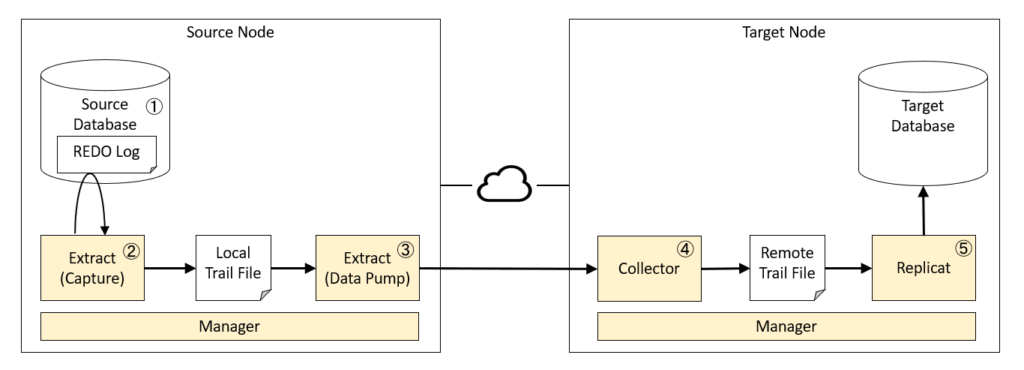
- Changes occur in the source database
– INSERT, UPDATE, and DELETE operations are executed. - Extract captures the changes
– Monitors the REDO log (transaction log) to capture changes.
– Writes only the necessary changes to the Local Trail File.
Note: Using the Trail File allows safe data transfer without directly accessing the database. - Data Pump transfers the data
– Sends the Local Trail File to the remote target node.
Note: Supports retransmission in case of network failures. - Collector receives the data
– Receives the data sent from the source node.
– Creates a Remote Trail File from the received data. - Replicat applies changes to the target
Reads the Remote Trail File and applies the changes to the target database.
Architecture of Oracle Real Application Clusters (RAC)
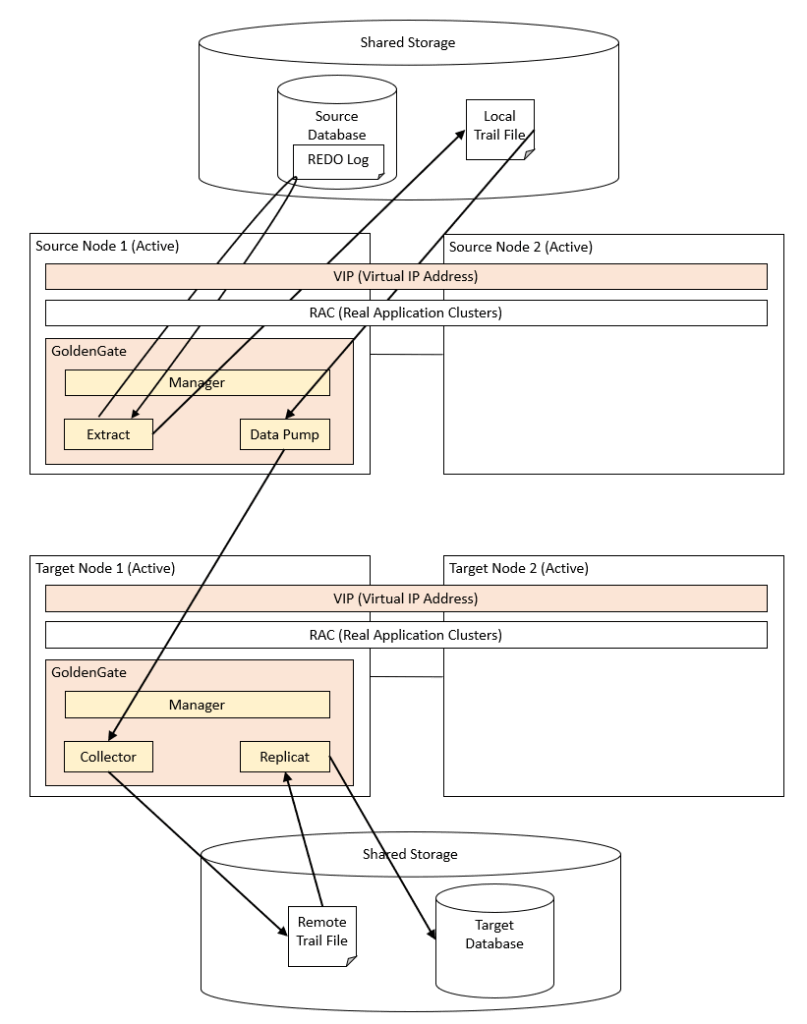
This section explains the architecture for deploying Oracle GoldenGate in an Oracle RAC environment.
Since GoldenGate does not support an Active-Active configuration, an Active-Standby configuration must be used. Here, we show an example where GoldenGate is deployed on Node 1 in a two-node setup.
- Overview of Configuration and Communication
– A VIP (Virtual IP) is configured on the source node.
– Even if one node fails, the source node can continue communicating with the target node without being aware of the failure.
- Failover Behavior (Source Side)
– If a failure occurs on source Node 1, GoldenGate-related resources fail over to source Node 2.
– After failover, data synchronization continues between source Node 2 and target Node 1.
- Failover Behavior (Target Side)
Similarly, if a failure occurs on the target node, resources switch to the other node, and synchronization continues.

Considerations for Oracle GoldenGate Implementation
Process Monitoring
Process monitoring is essential for the stable operation of GoldenGate. In particular, the Manager, Extract, Replicat, and Collector processes may stop during failures, and therefore must always be included as monitoring targets.
The following are common monitoring methods:
- Monitoring with monitoring software: Use tools such as Zabbix to check the operational status of processes.
- Monitoring with action scripts: Trigger automatic restarts or notifications when a process terminates abnormally or when processing delays occur.
An action script is a script executed based on predefined conditions, and it is an effective mechanism for automatic recovery or failover in GoldenGate operations. Typical use cases include:
- Periodically checking the status and automatically starting the process if it is stopped
- Collecting logs upon error detection, and attempting a restart while simultaneously sending a notification
- Running periodically using the OS job scheduler, such as cron
By implementing a monitoring mechanism, it becomes possible to detect failures at an early stage and enable automatic recovery, significantly improving the overall availability of the system.
Log Monitoring
Oracle Database trace logs and alert logs are commonly monitored in many environments, not limited to those with GoldenGate deployed. In addition, GoldenGate-specific events are recorded in ggserr.log, so this file should always be included in your monitoring scope.
In the initial phase, extracting messages such as “Error”, “WARNING”, “abnormally” allows you to detect major errors and important alerts. Subsequently, it is important to gradually tune the monitoring conditions according to the operational environment.
Time Lag Monitoring
Monitor the lag in data replication, defined as the difference between the timestamp of the last record processed by Extract/Replicat and the timestamp of the records in the Trail File. Temporary lag caused by peak processing is usually not problematic; however, if the lag persists or increases significantly, tuning may be required.
GoldenGate provides the following parameters to set lag thresholds:
- LAGCRITICALSECONDS: Generates a warning when lag exceeds the threshold in seconds.
- LAGCRITICALMINUTES: Generates a warning when lag exceeds the threshold in minutes.
- LAGCRITICALHOURS: Generates a warning when lag exceeds the threshold in hours.
By setting a threshold for any of these parameters, a warning message will be logged when the threshold is exceeded. This enables early detection of time lag and facilitates appropriate tuning.
Monitoring Disk Space for Trail File Storage
If the disk storing the Trail Files becomes full, data replication by GoldenGate may be halted. Therefore, implementing disk space monitoring is critically important.
In an Oracle RAC configuration, it is recommended to place Trail Files on shared storage (e.g., ACFS). In this case, ensure that the ACFS storage area is included in your monitoring scope.
Handling GoldenGate Downtime
If GoldenGate is running normally, there are no major issues. However, it is important to design and implement measures to handle downtime caused by maintenance or failures.
Disk Capacity Planning
During GoldenGate downtime, trail files will accumulate. Therefore, sufficient disk space must be secured in advance.
- Estimating Trail File Size
Trail File disk space = (Source REDO log size per hour) × (Allowed GoldenGate downtime in hours) × 0.4
Reference: Estimate Space for the Trails - Trail File Retention Settings
By default, trail files are automatically deleted after processing is complete.
Detailed settings can be controlled using the PURGEOLDEXTRACTS parameter:
USECHECKPOINTS (default): Deletes when all processes have completed processing
MINKEEPHOURS: Retain for the specified number of hours
MINKEEPDAYS: Retain for the specified number of days
MINKEEPFILES: Retain the specified number of files
Handling Cases of Disk Space Exhaustion
When an issue occurs with Extract on the source node
- Situation: Local trail files are not created from the REDO logs.
- Recovery: After Extract is restored, it is possible to create local trail files, but this requires the archive REDO logs.
- Key Points:
– Configure the archive REDO log retention period generously during the design phase.
– If necessary, adjust the retention period after a failure to prevent automatic deletion.
– Proper disk space planning for storing archive REDO logs is also critical.
- Alternative Approach:
If disk space is insufficient, consider temporarily offloading archive REDO logs using RMAN, then restoring them after GoldenGate has been recovered.

When an issue occurs with Datapump on the source node, the inter-node network, or the Collector on the remote node
- Situation: Local trail files are created, but remote trail files are not generated.
- Recovery: After the issue is resolved, remote trail files can be created. However, the local trail files must still exist.
- Key Points:
– If your configuration does not delete local trail files until they are successfully delivered to the target node, ensure sufficient disk space is allocated to store them.
– If your design deletes trail files after a certain retention period, configure the retention period generously, or adjust it after a failure to prevent automatic deletion.

When an issue occurs with Replicat on the remote node
- Situation: Remote trail files are created, but they are not applied to the target database.
- Impact: Since the remote trail files exist, it is not necessary to retain the local trail files.
- Key Points:
– If your configuration does not automatically delete remote trail files, ensure sufficient disk space is allocated for storing them.
– If your design deletes trail files after a certain retention period, configure the retention period generously, or adjust it after a failure to prevent automatic deletion.

Summary
Oracle GoldenGate is a high-availability replication product that enables real-time data replication across different databases. It supports a wide range of use cases, including disaster recovery, data migration, and providing data to analytical environments.
Key points for stable operation include:
- Process Monitoring: Check the status of Manager, Extract, Replicat, and Collector processes.
- Log Monitoring: Extract errors and warnings from ggserr.log and Oracle trace/alert logs.
- Lag Monitoring: Set thresholds using
LAGCRITICALSECONDS / MINUTES / HOURS. - Disk Space Management: Ensure sufficient disk capacity for trail files and prepare for accumulation during downtime.
- Downtime Handling: Retain and restore trail files and REDO logs properly when Extract or Replicat processes are stopped.
By incorporating these considerations into your system design and operations, you can maintain high availability while flexibly handling failures and maintenance activities.


 English
  Japanese
コメント