
What is Tomcat ?
Software for running servlets, a type of Java program, is called a “web container.” Among them, Tomcat is an OSS that is often deployed in conjunction with Apache, and is the de facto standard. Therefore, it is important to first understand the basic mechanism of Tomcat.
There are other web container products such as JBoss and other vendor’s products, but the basic concepts are often the same, so we recommend that you first use Tomcat to understand how it works.
Mechanism of parallel processing provided by Tomcat
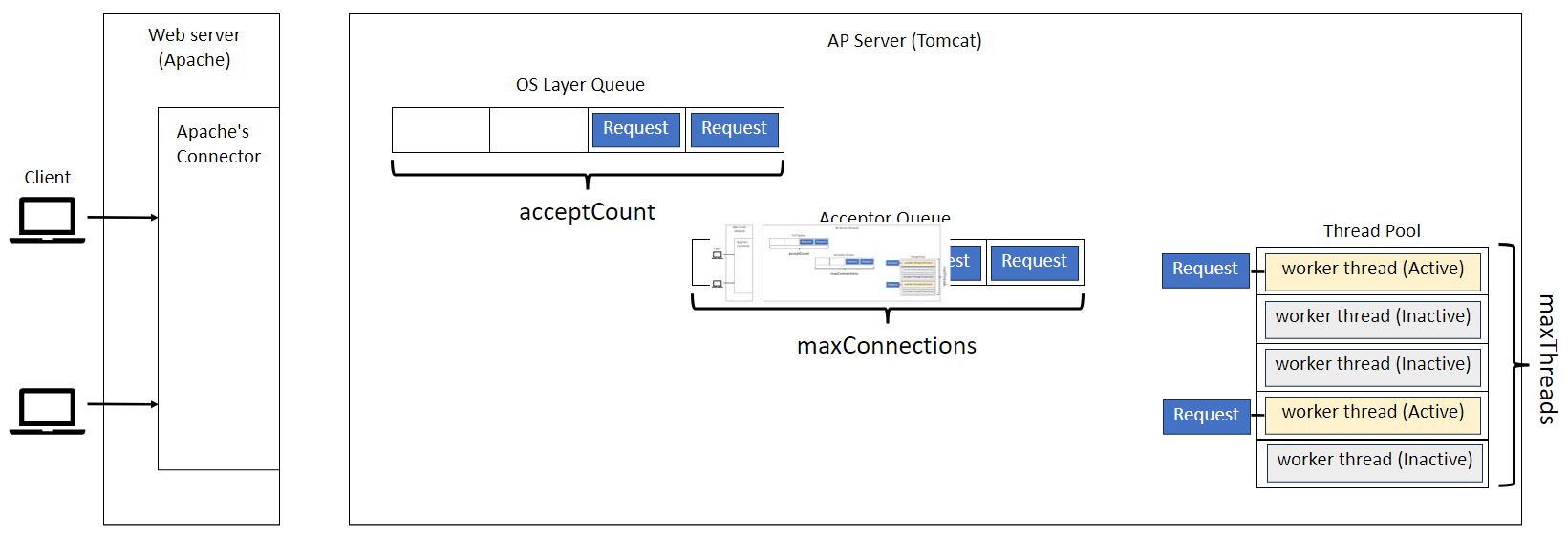
When Tomcat receives a request, it is stored in a queue. The queued requests are passed to the worker threads by the accept thread, and one worker thread communicates with the client one to one.

The flow of request processing in Tomcat is as follows:
1. A request from a client is first accepted by the web server (Apache).
2. An Apache connector such as mod_proxy or mod_jk forwards the request to Tomcat.
3. Tomcat’s Accept thread takes the request from the queue and stores it in the Acceptor queue.
4. A worker thread in the Thread Pool retrieves the request and begins processing it.
5. The worker thread is responsible for communicating with the client and returning a response.
Tuning Parameter for Tomcat
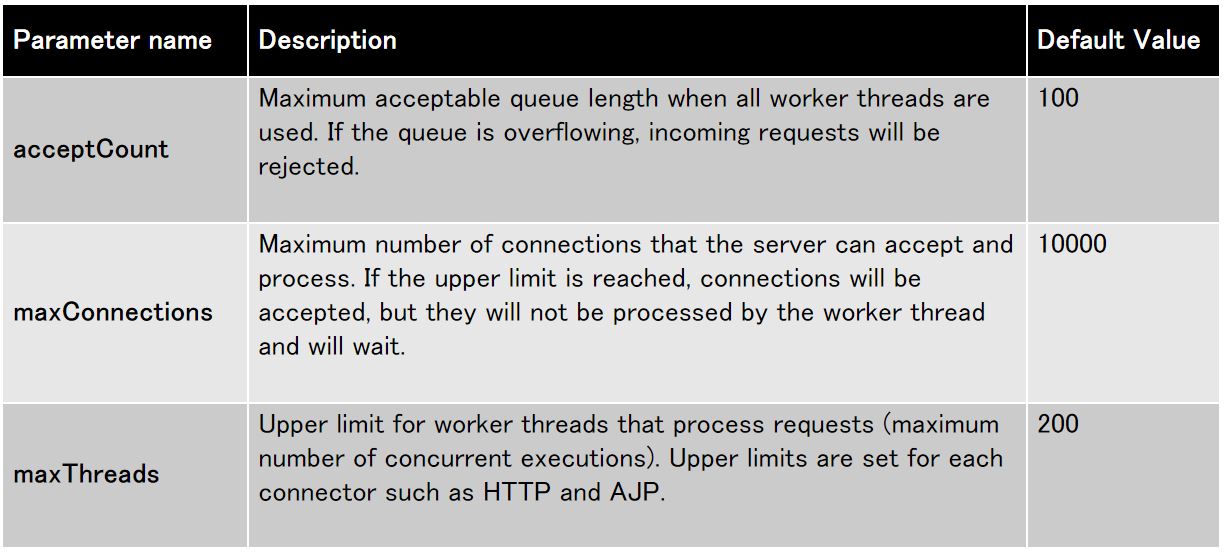
Tomcat requires one worker thread for each incoming request. If more requests arrive than the number of worker threads currently available, additional worker threads are dynamically created, up to the limit set by maxThreads.
If the number of simultaneous requests still exceeds the processing capacity, Tomcat accepts new connections until the current number of connections reaches the maxConnections limit. Requests that exceed the limit are temporarily stored in an internal queue by the Acceptor thread, waiting for a worker thread to become free.
If more requests arrive and maxConnections is exceeded, the overflowing connection requests are sent to the connection queue at the OS layer. The maximum number of this queue is controlled by acceptCount. Connections that exceed the acceptCount limit are either rejected or disconnected due to a timeout.
Let me summarize the contents of the above parameters. I recommend tuning to an appropriate value based on the performance test results.
Reference
If you want to know more detail, please refer to below link.
Tuning Apache Tomcat for handling multiple requests
https://medium.com/@mail2dinesh.vellore/tuning-apache-tomcat-for-handling-multiple-concurrent-requests-99eee0d76dc0
Summary
This article provides an overview of Tomcat, a widely used web container for running Java servlets, covering its basic architecture, the mechanism of parallel processing, and key performance tuning points.
Basic Architecture of Tomcat: Tomcat is an open-source web container that is often used in conjunction with web servers like Apache, providing an environment to efficiently execute servlets. Understanding Tomcat gives you foundational knowledge that can also be applied to other web container products.
Parallel Processing Flow: Requests are passed to Tomcat via an Apache connector, where the accept thread manages the queue and worker threads handle individual request processing. This mechanism allows Tomcat to efficiently handle a large number of concurrent requests.
Tuning Parameters: By properly configuring parameters such as maxThreads, maxConnections, and acceptCount, you can prevent performance degradation when the number of concurrent connections or requests increases. It is important to adjust these settings based on the results of performance tests.
Since Tomcat’s performance can vary significantly depending on its configuration, it is recommended to tune it according to system requirements and access patterns. By understanding the concepts introduced in this article, you can grasp the basics of Tomcat’s operation and performance management, contributing to a more stable web service operation.


 English
  Japanese
コメント