
Introduction
In today’s world, where IT systems are increasingly cloud-based and managed services obscure their internal structures, some say the demand for infrastructure engineers is shrinking. However, I do not necessarily agree. Engineers specializing in performance will remain indispensable. This is because, no matter how much systems become black boxes, performance tuning tailored to the characteristics of each system is unavoidable. At the same time, performance design is highly challenging, and I feel that there is not enough well-organized, systematic knowledge available as a reference during the design phase. Therefore, in this article, I will introduce best practices for performance design by summarizing key know-how on rate limiting design.
The Purpose of Rate Limiting
Rate limiting is a function that restricts the number of requests processed in order to keep the system running stably when user requests concentrate heavily. If an unexpectedly large number of requests occur on peak days, or if a large volume of requests is sent due to external factors such as DDoS attacks or bot access, accepting all requests without any restriction can cause response delays. In the worst case, resource exhaustion may cause the server to crash, resulting in a complete system outage. Additionally, in cloud environments, unexpected high resource consumption can lead to costly charges.
The basic policy for rate limiting design
Rate limiting should not be designed at a single layer; it is necessary to implement rate limiting at each layer according to its specific purpose. The layers where rate limiting is applied vary depending on the system architecture. Using the diagram below as an example, we will explain the key points of rate limiting in a web system.

Rate Limiting for Burst Traffic
For burst traffic (sudden spikes in traffic), it is important to apply rate limiting as close to the frontend as possible, such as at the load balancer or API gateway.
If rate limiting is applied at a deeper layer, upstream components (such as application servers or databases) may experience excessive load, potentially impacting the entire system.
However, depending on the system, there may be restrictions on which layers can implement rate limiting. In this section, we will introduce several possible options.
1. Burst Traffic Mitigation with CDN (Content Delivery Network)
As a basic principle, applying rate limiting at the CDN, which sits at the very front of the system, is highly effective. However, depending on the CDN product in use, it may not provide the desired level of rate limiting, or the monitoring and operational overhead may be significant, making implementation impractical. Therefore, carefully evaluate whether to introduce such measures. In this section, we will briefly introduce rate limiting options available with Cloudflare and Akamai.
- Rate Limiting with Cloudflare
Cloudflare can automatically detect excessive requests to specific URLs or to an entire domain and apply rate limiting at the Layer 7 (L7) level. For example, you can create a rule that blocks requests and returns an HTTP 403 (Forbidden) status if more than 100,000 requests are made within a 10-minute evaluation window. You can choose to block all requests for a certain period after exceeding the threshold or block only the requests exceeding the threshold. Additionally, instead of blocking, you can configure throttling to delay responses.Cloudflare’s free plan also supports rate limiting, but it is limited to a single rule and only allows blocking as the action when the threshold is exceeded. For commercial use, consider upgrading to a paid plan. For example, the Business plan or higher includes access to the Waiting Room feature (*) at no additional cost.
*Waiting Room Feature
When traffic spikes occur, users exceeding the predefined maximum number of concurrent connections are redirected to a Waiting Room. These users are queued and allowed to access the production site when capacity becomes available. This functionality typically uses cookies or tokens to control the queue order based on request time. - Rate Limiting with Akamai
The triggering conditions and behaviors when thresholds are exceeded in Akamai are fundamentally similar to those of Cloudflare. However, it is necessary to select the appropriate Akamai product depending on your objectives. For example, to implement rate limiting based on IP addresses, you would use Kona Site Defender, while for detailed rate limiting at the API level, you would use API Gateway. Compared to Cloudflare, Akamai’s configuration is somewhat more complex and requires a higher level of expertise. Therefore, it is recommended to work with Akamai support to fine-tune your settings. For functionality similar to a Waiting Room, Akamai provides Visitor Prioritization. However, this mechanism applies limits at each individual Edge server. As a result, when overall traffic surges, there is a risk that the backend could still become overloaded. Implementing proper real-time monitoring is therefore essential. For more information on Akamai’s overall rate limiting capabilities, refer to the following article.
Demystifying API Rate Limiting | Akamai Blog
2. Burst Traffic Mitigation with Network Devices
If implementing rate limiting via CDN is difficult, it is also possible to apply restrictions on network devices (NW devices) downstream. Network devices include routers, firewalls, load balancers, UTM (Unified Threat Management), switches, and others. Please consider introducing these according to your system architecture. However, rate limiting on network devices is mainly performed at Layer 4 (transport layer) or lower. Compared to Layer 7 rate limiting, detailed error responses cannot be returned to users, which may increase the likelihood of user retries. Therefore, it is recommended to use rate limiting on network devices in combination with other mechanisms. Depending on the device, the main bandwidth restrictions that can be configured on typical network devices are as follows.
- Classification / Marking
Classification functions allow traffic to be grouped based on information such as IP addresses, MAC addresses, or port numbers. Priorities can be assigned to each classification, enabling bandwidth restrictions to be applied accordingly. Additionally, specific QoS (Quality of Service) information can be added to network traffic to control priority. - Policing
Policing is a method that discards packets exceeding a predefined traffic limit. Although this causes data loss, it results in minimal communication delay, making it suitable for real-time services such as voice communications. - Shaping
Shaping buffers packets that exceed the traffic limit and transmits them sequentially. While this introduces delay, it reduces packet loss, making it appropriate for services like file transfers where data loss is unacceptable.
3. Burst Traffic Mitigation in API Gateway
A common method to control burst traffic in API Gateway is by configuring throttling. Throttling is a mechanism that limits the number of requests accepted within a specified time frame. Because throttling behavior varies slightly across major API products, it is important to understand each product’s specifications accurately before setting limits. Here, we introduce examples using Amazon API Gateway and Apigee.
- Burst Traffic Mitigation in Amazon API Gateway
Amazon API Gateway allows throttling to be configured at the following four levels:
– AWS Region (cannot be changed)
– Account level (changeable but requires a limit increase request)
– API stage (e.g., dev, prod) and method (e.g., GET, POST)
– Client (per user or application)
Typically, throttling is set at the API stage, method, or client level. Settings can be configured via the “Throttling Settings” page in the Amazon API Gateway section of the AWS Management Console, where you specify the burst limit.
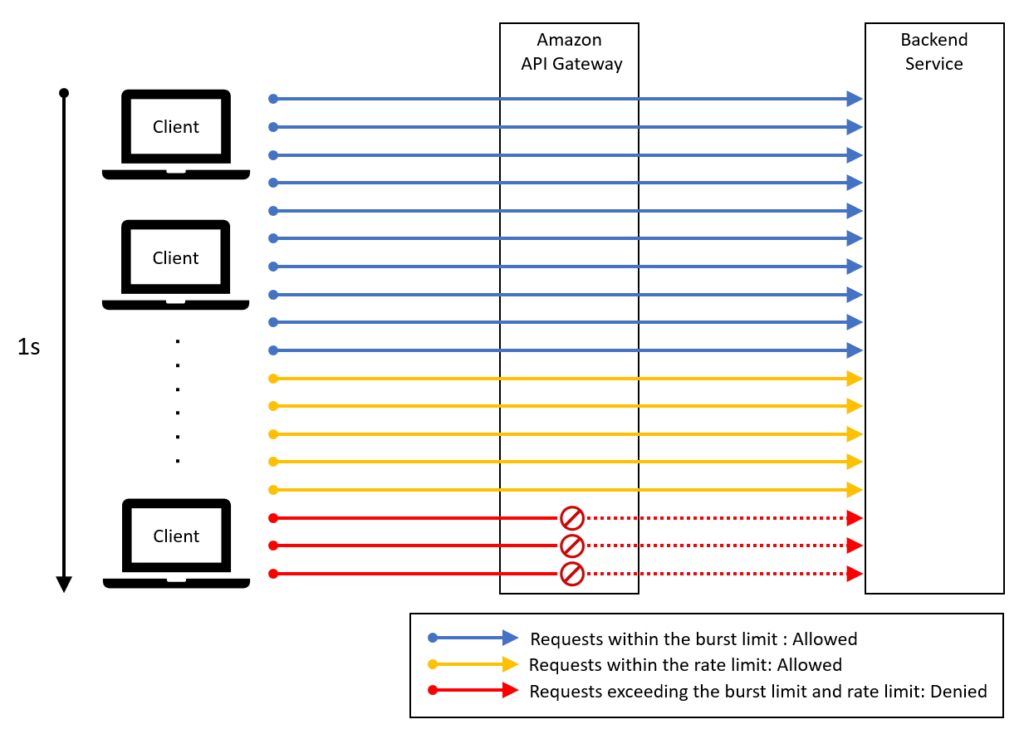
Throttling settings work in conjunction with rate limits. For example, if the burst limit is set to 10 requests per second and the rate limit is 5 requests per second, the first 10 requests per second are allowed, followed by a maximum of 5 requests per second thereafter. Requests exceeding these limits will be throttled.
- Burst Traffic Mitigation in Apigee
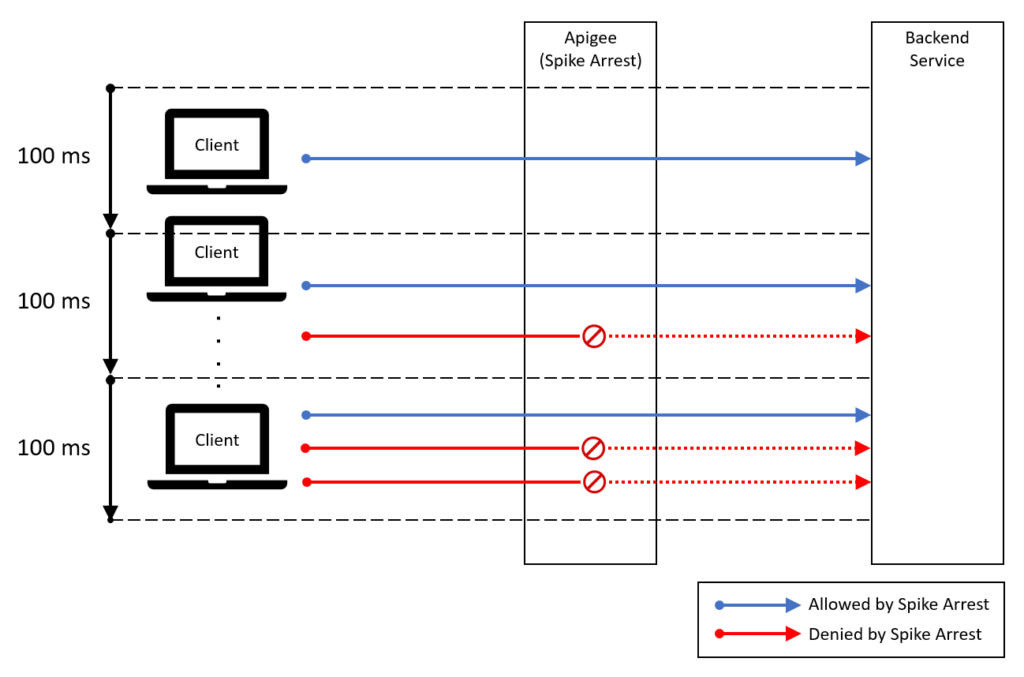
In Apigee, you can prevent sudden spikes in traffic by using the Spike Arrest policy. For example, if the rate is set to 10 requests per second, requests are smoothed so that one request is allowed every 100 milliseconds (1 second ÷ 10). It operates as illustrated in the diagram below.
4. Burst Traffic Mitigation on Web Servers
When implementing rate limiting on a web server to handle burst traffic (sudden surges in access), it is common to restrict the number of simultaneous connections. This section introduces rate limiting methods used in popular middleware.
- Burst Traffic Mitigation in Nginx
Nginx provides multiple modules for rate limiting. Their functions are as follows:
– limit_conn (Concurrent Connection Limiting)
This module limits the number of simultaneous connections for a specific key. By restricting concurrent access from multiple users, you can protect backend server resources.
– Specify an IP address as the key to limit connections from a specific source.
– Specify a URI as the key to limit the number of connections per URI.
– worker_processes / worker_connections (Server-Wide Concurrent Connection Limiting)
While limit_conn can only limit concurrent connections for specific keys, you can restrict the total number of concurrent connections for the entire Nginx server by combining worker_processes and worker_connections.
The maximum concurrent connections can be calculated as:
Max concurrent connections = worker_processes × worker_connections
– worker_processes: The number of worker processes spawned by Nginx. Adjust this based on the number of CPU cores on the server, or use the auto setting to configure it automatically.
– worker_connections: The maximum number of simultaneous connections each worker process can handle.
Note: You should also tune the worker_rlimit_nofile parameter, which defines the maximum number of file descriptors a worker process can open.
– limit_req (Request Rate Limiting)
This module limits the number of requests for a given key. It helps protect backend resources by suppressing excessive short-term request bursts.
– Similar to limit_conn, you can set an IP address or URI as the key for restriction.
– limit_rate (Bandwidth Limiting)
This setting limits the transfer rate per connection. By preventing a single user from monopolizing bandwidth, it ensures fair bandwidth allocation to other users. The limit can be set in bytes per second.
Reference:Tuning NGINX for Performance - Burst Traffic Mitigation in Apache
– MaxRequestWorkers (Concurrent Connection Limiting)
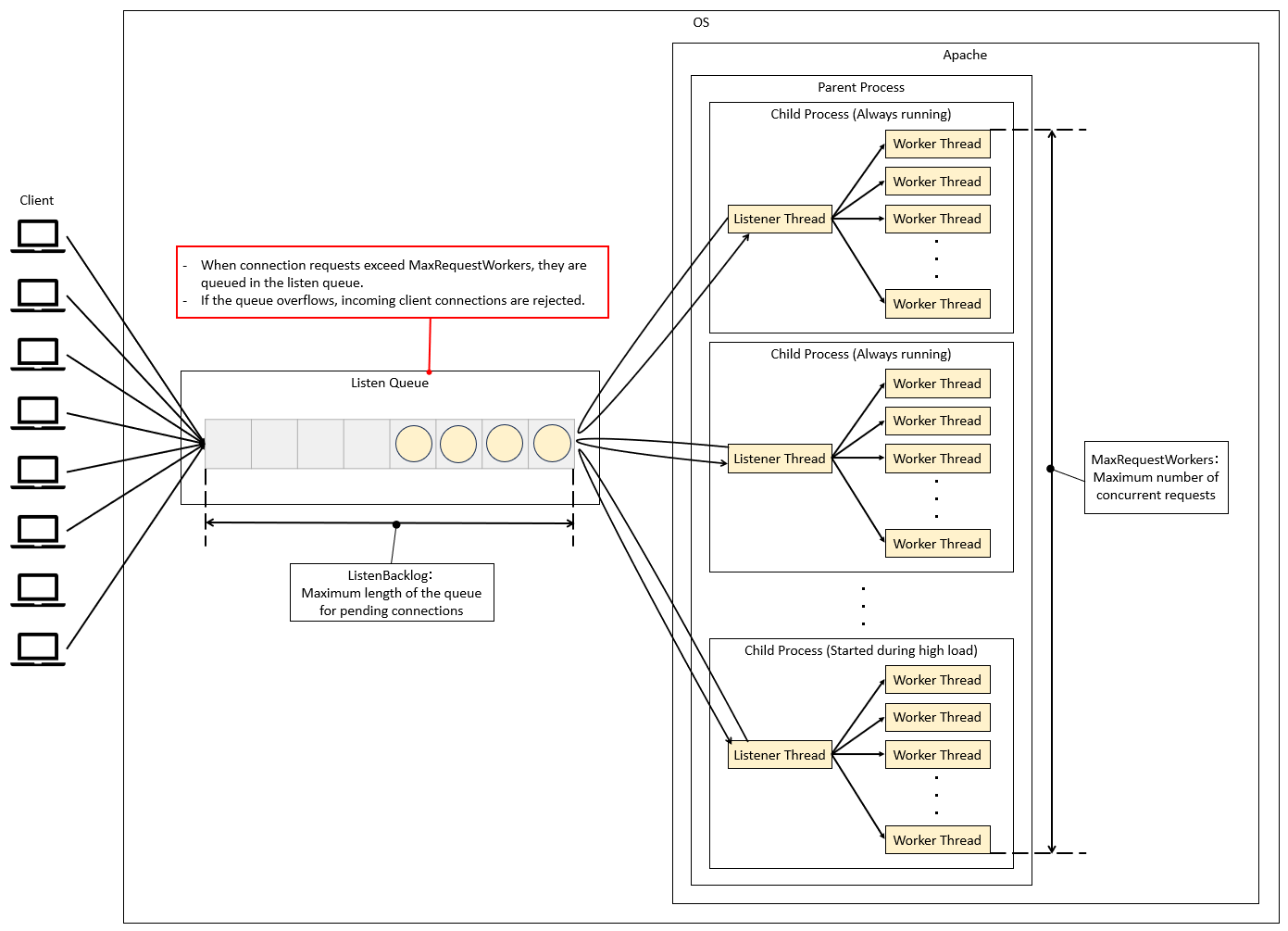
By configuring MaxRequestWorkers, you can limit the total number of concurrent connections for the entire Apache server (known as MaxClients in Apache 2.4 and earlier). Apache also has other parameters related to rate limiting, such as ListenBacklog, which controls the length of the listen queue. The diagram below illustrates the relationship between MaxRequestWorkers and the listen queue.
Limiting Continuous High Traffic
As mentioned earlier, burst traffic is controlled at the front-end devices, but it is also important to implement rate limiting for continuous high traffic. In particular, appropriate settings should be considered on the back-end to prevent excessive load on core components of the system, such as the database servers.
5. High-Traffic Measures at the AP Server Layer
The key points to manage on the AP server are mainly the thread pool, the application, and the database connections.

- High-Traffic Measures Using Thread Pools
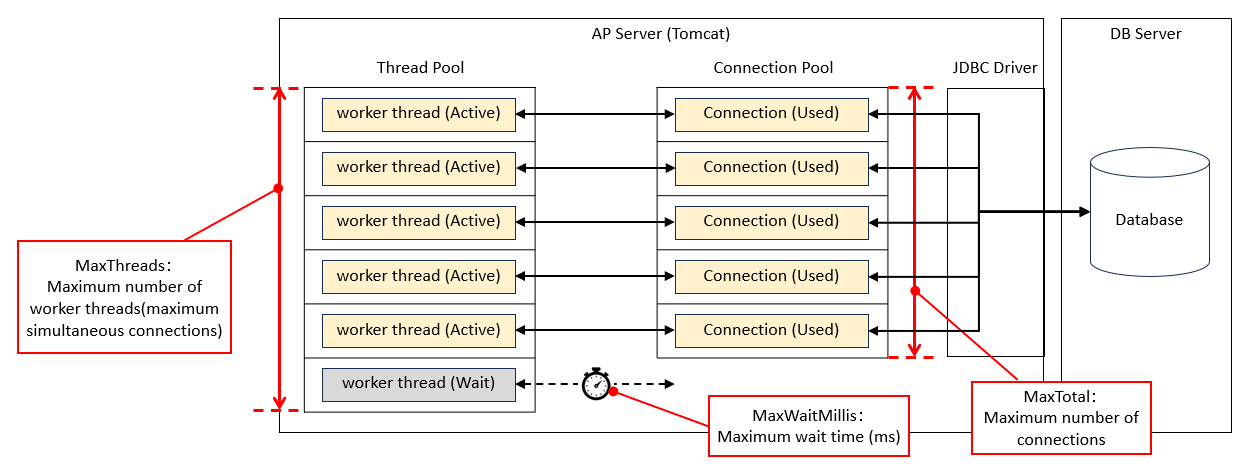
Using Tomcat as an example, we will explain the key parameters related to rate limiting. As shown in the figure below, the queue has a two-tier structure, and it is necessary to set appropriate values for each level.
– acceptCount
The maximum queue length for requests when all worker threads are in use. If the queue overflows, incoming requests will be rejected.
-maxConnections
The maximum number of simultaneous connections the server can accept and process. When this limit is reached, the server will still accept connections, but they will wait without being processed by worker threads.
– maxThreads
The upper limit of worker threads that process requests (maximum concurrent executions). This can be set separately for each connector, such as HTTP or AJP.

- High-Traffic Measures at the Application Level
In high-traffic environments, it is possible to implement rate limiting at the application level. However, it is generally recommended to control traffic at the network or server layer. Implementing rate limiting in the application can increase development complexity, so it should only be considered when necessary.
As a reference, the Java library Resilience4j makes it easy to implement a rate limiter. The official documentation also provides concrete examples, so you can check it out if you are interested.
- High-Traffic Measures for Database Connections
In high-traffic environments, excessive simultaneous connections to the database can cause connection waits or timeouts. In Tomcat, this issue can be addressed by properly configuring the database connection pool.
– MaxTotal
The maximum number of connections that can exist in the pool at the same time. Requests exceeding this limit will either wait or timeout.
– MaxWaitMillis
The maximum time (in milliseconds) to wait for a connection to become available. If this time is exceeded, an exception will be thrown.
Conclusion
That concludes our overview of best practices for rate limiting in web systems. While there are many factors to consider and the design can be quite challenging, it is a critical element for ensuring stable system operation. Therefore, I recommend conducting performance testing and tuning the system based on an appropriate design.


 English
  Japanese
コメント