
Introduction
Linux serves as the foundation for many servers and systems, making it an essential technology for infrastructure engineers. Among its core components, memory management is particularly important for ensuring stable system operation. However, many people may not fully understand the detailed mechanisms Linux uses to manage memory.
This article explains virtual memory in Linux in a way that beginners can understand, starting from the basics. I hope you read through it and find it useful in your daily work.
Physical Memory
Before discussing virtual memory, it is important to understand physical memory. Physical memory refers to the storage devices installed in a computer, such as RAM (Random Access Memory), which is composed of IC chips.

Virtual Memory
What is Virtual Memory?
Virtual memory is a memory management mechanism provided by the operating system that allows a process to see a contiguous memory space regardless of how physical memory is actually arranged. Most operating systems, except some embedded OSes, use virtual memory because it provides various advantages.
Here is an overview of how virtual memory works:

- The CPU executes instructions and accesses or updates data using virtual addresses. It does not directly interact with physical addresses.
In reality, virtual and physical memory are divided into fixed-size blocks called pages (commonly 4 KB), which are managed in these units. - The mapping between virtual addresses and physical addresses is handled by a hardware component called the Memory Management Unit (MMU). The MMU references a page table to translate virtual addresses into physical addresses.
Page tables are not a single flat table but use a hierarchical structure to handle large virtual address spaces efficiently and optimize memory usage.
To avoid delays from frequent page table lookups, the MMU includes a Translation Lookaside Buffer (TLB), a cache that stores recently used address translations and speeds up memory access. - When a virtual address is accessed, the corresponding data in physical memory is retrieved or updated.
Benefits of Virtual Memory
The main advantages of virtual memory are:
- Expanded Address Space
- Efficient Use of Physical Memory
- Isolation of Address Spaces Between Processes
Expanded Address Space
By using virtual memory, each process can have a large address space beyond the constraints of physical memory. Programs can run memory-intensive tasks without worrying about the actual physical memory capacity.
When physical memory is insufficient, the system can use a swap space (temporary storage on disk) to provide additional virtual memory, allowing the system to handle memory demands that exceed physical capacity.

Efficient Use of Physical Memory
Virtual memory enables more efficient use of physical memory in several ways:
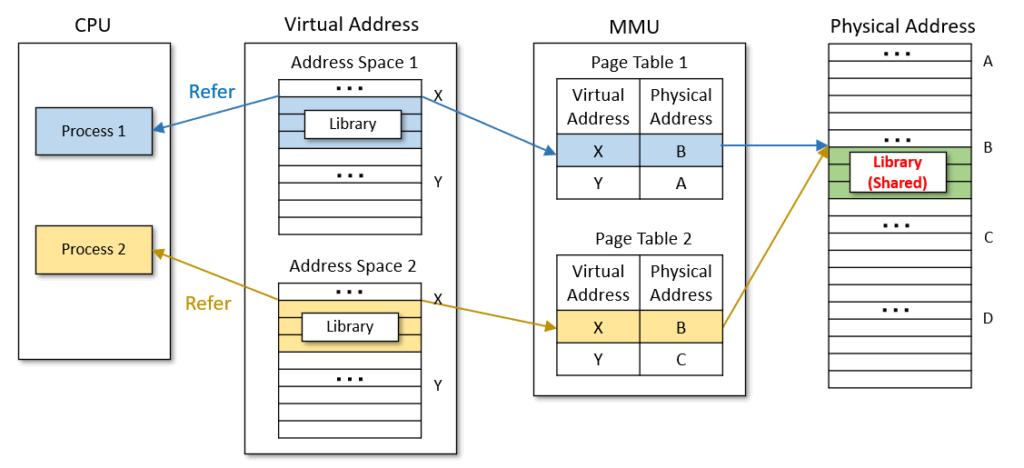
Shared Libraries
Multiple processes using the same shared library can reference the same physical memory region, reducing duplication and increasing memory efficiency.
Copy-On-Write (COW)
When a process is duplicated using the fork() system call, the parent and child processes temporarily share the same physical memory.

The relevant page is copied only when a write occurs, and a new allocation in physical memory is made at that time.

Isolation of Address Spaces Between Processes
Each process has its own virtual address space and corresponding page tables, which are created separately and isolated from one another. This separation of virtual address spaces prevents memory regions from being shared between different processes, thereby enhancing security*. Moreover, because processes do not interfere with each other’s memory space, an issue in one process does not affect others, improving overall system stability.
*Excluding memory shared via shared libraries or between parent and child processes.

Conclusion
This concludes the explanation of virtual memory in Linux. Surprisingly few people fully understand its mechanisms, so this is a good opportunity to deepen your knowledge and apply it in troubleshooting and other practical scenarios.


 English
  Japanese
コメント